
Table of Contents
- Introduction
- Two Commands. That's It.
- What SWEny Handles For You
- The Generated Workflow
- How It Works Under the Hood
- The Wizard
- Template Variables
- Test Data Cleanup
- Cross-Node Data Flow
- Data Provisioning via curl
- Real-World: KidMath Conversion Funnel
- Why This Beats Playwright and Cypress
- Cost
- GitHub Actions
- Going Deeper: The Programmatic API
- Beyond E2E: What Else Can You Orchestrate?
- Lessons Learned
- Wrapping Up
- Resources
Introduction
I've maintained Playwright and Cypress suites across multiple production apps. You probably have too. You know the drill: a designer moves a button, changes a class name, or reorders a form, and suddenly half your E2E suite is red. You didn't break anything. The app works fine. But your tests are coupled to implementation details that have nothing to do with user behavior.
The maintenance cost isn't just the time you spend fixing selectors. It's the trust erosion. After a few false positives, your team stops taking E2E failures seriously. The suite becomes background noise. And that's worse than having no tests at all, because now you have false confidence.
What if you could replace all of that with two commands? No test framework. No selectors. No page objects. No assertion library. Just describe your flows in plain English, and an AI agent figures out the rest.
That's what SWEny does. Run sweny new, pick "End-to-end browser testing" from the menu, and a wizard generates workflow-based browser tests. Run them with sweny e2e run and an AI agent drives a real browser via the accessibility tree. The agent reads the page the way a screen reader does, reasons about what it sees, and interacts using element references. When the UI changes, the agent adapts. You maintain YAML files with natural language instructions, not test code.
This post walks through how it works, what gets generated, and how to customize it. I'll also show a real production case study: the KidMath.ai conversion funnel tested end-to-end, with actual run output and screenshot evidence.
Two Commands. That's It.
# 1. Create your E2E workflows
sweny new
# → pick "End-to-end browser testing" from the menu
# → choose flows, configure cleanup, done

# 2. Run all generated tests
sweny e2e run
sweny new is a unified project setup command. It opens an interactive picker where you choose what kind of workflow to create: a built-in template (PR review, issue triage, security audit, release notes), an AI-generated workflow from a description, or — the one we care about here — end-to-end browser testing. Pick that option and a dedicated E2E wizard takes over, asking which flows to test (registration, login, purchase, onboarding, upgrade, cancellation, or custom), collecting details per flow (URL paths, form fields, success criteria), and generating self-contained workflow YAML files in .sweny/e2e/. The run command loads those files, resolves template variables, and executes each one with an AI agent driving agent-browser.
Here's what the output looks like:
──────────────────────────────────────────────────
E2E Test Run
  Target:  http://localhost:3000
  Run ID:  1712345678
──────────────────────────────────────────────────

▶ registration.yml
  ✓ setup — ready (3.2s)
  ✓ test_registration — pass (12.4s)
  ✓ report — done (1.1s)

▶ purchase.yml
  ✓ setup — ready (2.1s)
  ✓ login — pass (8.3s)
  ✓ test_purchase — pass (15.7s)
  ✓ report — done (1.0s)

Results: 2/2 workflows passed
Exit code 0 if everything passes, 1 if anything fails. CI-friendly out of the box.
What SWEny Handles For You
If you were to build this yourself, you'd need a TypeScript runner, a shell script to manage the browser daemon, a custom browser skill with tool handlers, template variable injection, and cleanup logic. That's a lot of plumbing for something that should be simple. SWEny handles all of it:
| Concern | DIY Approach | Now (sweny e2e) |
|---|---|---|
| Workflow definition | Write YAML by hand | Generated by sweny new wizard |
| Browser automation | Custom skill with tool handlers | Agent drives agent-browser directly via shell commands |
| Daemon lifecycle | Shell script (run.sh) with trap/poll | Setup node handles install, start, and readiness polling |
| Template variables | Manual string replacement in runner | Auto-resolved from env vars and run ID |
| Test data cleanup | Custom cleanup.ts per project | Wizard generates backend-specific cleanup node |
| Runner / orchestration | Custom runner.ts with execute() | sweny e2e run (built-in) |
| CI exit codes | Manual process.exit mapping | Built-in: 0 = pass, 1 = fail |
| Dependencies | @sweny-ai/core + tsx + yaml | Just sweny (already installed) |
The shift is that you no longer write any TypeScript for your E2E suite. The entire test suite lives in YAML files that the wizard generates and you customize. SWEny handles orchestration, the agent handles browser interaction, and the generated workflow handles the structure.
Here's the before and after in file count:
e2e/
  run.sh              # daemon lifecycle
  runner.ts           # custom orchestration
  cleanup.ts          # test data cleanup
  skills/
    browser.ts        # 200+ line skill
  e2e-uat.yml         # hand-written workflow
  package.json        # 3 dependencies
.env.sweny/
e2e/
registration.yml # generated
login.yml # generated
purchase.yml # generated
.env # appended by wizardSeven files vs three generated YAML files and an env var.
The Generated Workflow
Each flow you select in the wizard becomes a self-contained workflow YAML file. The simplest case is a three-node DAG:
Here's the full YAML for a registration test:
id: e2e-registration
name: "E2E: Registration"
description: End-to-end test for registration flow
entry: setup

nodes:
  setup:
    name: Browser Setup
    instruction: |-
      Install agent-browser if missing, start the daemon,
      poll until ready.
    output:
      type: object
      properties:
        status:
          type: string
          enum: [ready, fail]
      required: [status]

  test_registration:
    name: "Test: Registration"
    instruction: |-
      Navigate to {base_url}/signup. Take a snapshot.
      Fill the registration form:
        - email: {test_email}
        - password: {test_password}
        - name: E2E Test User
      Submit the form. Wait 3 seconds. Take a snapshot.
      Verify redirect to /dashboard.
      Take a screenshot as evidence.
      Report pass if registration succeeded, fail otherwise.
    output:
      type: object
      properties:
        status: { type: string, enum: [pass, fail] }
        error: { type: string }
      required: [status]

  report:
    name: Test Report
    instruction: |-
      Compile results from test_registration.
      Report pass/fail counts and any errors.

edges:
  - from: setup
    to: test_registration
    when: "setup status is ready"
  - from: setup
    to: report
    when: "setup status is fail"
  - from: test_registration
    to: report
The structure is always the same: setup, test node(s), optional cleanup, report. The setup node bootstraps agent-browser (installing it if needed). Test nodes contain natural language instructions. The report node aggregates results. Conditional edges short-circuit to the report if setup fails.
Auth-dependent flows (purchase, onboarding, upgrade, cancellation) automatically get a login node inserted before the test node:
Each workflow is independent. A purchase workflow includes its own login step so it can run in isolation. No shared state between workflows.
How It Works Under the Hood
SWEny's e2e run command does five things:
- Discovers workflow files from
.sweny/e2e/*.yml(or a specific file if you pass one). - Builds template variables from environment variables. Auto-generates
run_id,test_email, andtest_password. Picks up anyE2E_*env vars. - Resolves variables in every node instruction by replacing
{base_url},{test_email}, etc. with real values. - Executes each workflow sequentially using SWEny's DAG executor. The AI agent walks the accessibility tree, reasons about what it sees, and calls agent-browser shell commands to interact. Each node returns structured output (pass/fail). Conditional edges route the flow.
- Reports results with per-node timing and a pass/fail summary. Exits 0 or 1 for CI gating.
The agent doesn't use screenshots or vision. agent-browser reads the accessibility tree and returns a text representation with element references like @e1, @e2, @e3. The agent uses those refs to click, fill, and scroll. Text tokens only. No vision tokens. This is fast, cheap, and more reliable than pixel-based approaches.
Key design decision: The agent drives agent-browser directly via shell commands. There's no browser "skill" in SWEny core. The setup node teaches the agent which commands are available (open, snapshot, click, fill, press, scroll, screenshot, etc.) and the agent reasons about when to use each one. This keeps the system simple and means SWEny doesn't need to maintain a browser automation layer.
The Wizard
Run sweny new and you get an interactive picker:
? What do you want to do?
    PR Review Bot — automated code review on pull requests
    Issue Triage — classify, prioritize, and label incoming issues
    Security Audit — scan code and dependencies for security issues
    Release Notes — generate release notes from commits and PRs
  ● End-to-end browser testing — automated browser tests for your app
    Describe your own — AI-generated from your description
    Start blank — just set up config
Select End-to-end browser testing and SWEny hands off to a dedicated E2E wizard. It asks which user flows to cover:
| Flow Type | What It Tests |
|---|---|
| Registration | Signup form with auto-generated test credentials |
| Login | Authentication with existing or generated credentials |
| Purchase | Pricing page through checkout (includes login) |
| Onboarding | Multi-step wizard after login |
| Upgrade | Plan change flow after login |
| Cancellation | Cancel/downgrade flow after login |
| Custom | Any flow you describe in a sentence |
For each flow, the wizard asks for the URL path, success criteria, and any flow-specific details (form fields for registration, payment provider for purchase). It generates one YAML file per flow in .sweny/e2e/and appends the necessary env vars to your .env.
The generated files are version-controllable. Check them into your repo so everyone on the team can run sweny e2e run with the same test suite. When you want to change what a test verifies, edit the YAML. When you want to add a flow, run sweny new again or copy an existing file.
Template Variables
Workflow instructions use {variable} placeholders that are auto-resolved at runtime:
| Variable | Source | Example |
|---|---|---|
{base_url} | E2E_BASE_URL env var | http://localhost:3000 |
{run_id} | Auto-generated timestamp or RUN_ID env var | 1712345678 |
{test_email} | Auto-generated from run_id | e2e-1712345678@yourapp.test |
{test_password} | Auto-generated from run_id | E2eTest!1712345678 |
{email} | E2E_EMAIL (falls back to test_email) | test@example.com |
{password} | E2E_PASSWORD (falls back to test_password) | secret123 |
{*} | Any E2E_* env var (prefix stripped) | E2E_API_KEY becomes {api_key} |
The e2e-{timestamp}@yourapp.test naming convention is deliberate. Any email matching that pattern is guaranteed to be test data, which makes cleanup safe and simple.
Test Data Cleanup
When you enable cleanup in the wizard, SWEny generates a cleanup node that runs between the last test and the report. The node contains backend-specific instructions for the agent:
- Supabase: Deletes test users via Auth Admin API using SUPABASE_SERVICE_ROLE_KEY
- Firebase: Deletes test users via Firebase Admin SDK
- PostgreSQL: Deletes test records matching
e2e-{run_id}via DATABASE_URL - REST API: Calls your app's own admin endpoint with a service token
- Other: Generic instructions for the agent to clean up however the app supports
Cleanup is convention-based. Test emails follow e2e-{timestamp}@yourapp.test, so the agent finds them by prefix match. No tracking table. No shared state. If the service key isn't available, the agent skips cleanup gracefully.
Belt and suspenders. The cleanup node runs regardless of whether the tests pass or fail. This catches stale data from the current run. For data from crashed previous runs, run sweny e2e run cleanup.yml separately, or let the next run's agent find and delete orphaned test users by the naming convention.
Cross-Node Data Flow
This is the pattern that makes everything self-contained. Each node's structured output is available as context to every subsequent node. No config files, no shared state, no template variables needed for runtime values.
Two variable systems, intentionally separate. The {base_url} style from the Template Variables section is resolved by SWEny at startup from env vars. The <RUN_ID> style you'll see below is resolved at runtime by the agent, pulling from upstream node output. Rule of thumb: curly braces for startup config, angle brackets for runtime node context. Keep env vars for secrets, node outputs for test data.
The provision node generates credentials, creates test data, and outputs everything subsequent nodes need. Test nodes reference these values naturally:
# The provision node outputs runtime values
provision:
  instruction: |-
    Generate a unique run ID: date +%s
    Create test email: e2e-<RUN_ID>@yourapp.test
    Create test user via admin API...
    Output: base_url, run_id, test_email, test_password, user_id
  output:
    properties:
      status: { type: string, enum: [ready, fail] }
      base_url: { type: string }
      user_id: { type: string }
      test_email: { type: string }
      test_password: { type: string }

# Subsequent nodes reference values from provision's context
test_signin:
  instruction: |-
    Use the test_email and test_password from the provision step.
    Navigate to <BASE_URL>/auth...
    # Claude knows these values — they're in its context

test_purchase:
  instruction: |-
    Use the user_id from the provision step to update
    the subscription via PostgREST...
    # Claude remembers the user_id from provision's output
This works because each node in the DAG receives the accumulated context from all its predecessors. The agent doesn't need template variable resolution or environment variable lookups for test-specific values. It just remembers. Infrastructure credentials like $SUPABASE_URL and $SUPABASE_SERVICE_ROLE_KEY still come from env vars, read by the shell when the agent runs curl commands. Secrets stay in env vars, test data flows through node outputs.
Data Provisioning via curl
One of the biggest simplifications: test data provisioning lives directly in the workflow YAML as curl commands. No cleanup.ts, no Supabase SDK, no build step. The agent reads env vars and calls your backend's admin API.
provision:
  instruction: |-
    STEP 1 — Clean up stale test users:
    curl -s "$SUPABASE_URL/auth/v1/admin/users?per_page=100" \
      -H "apikey: $SUPABASE_SERVICE_ROLE_KEY" \
      -H "Authorization: Bearer $SUPABASE_SERVICE_ROLE_KEY"
    Find users matching e2e-*@yourapp.test. Delete each.

    STEP 2 — Create pre-confirmed test user:
    curl -s -X POST "$SUPABASE_URL/auth/v1/admin/users" \
      -H "apikey: $SUPABASE_SERVICE_ROLE_KEY" \
      -H "Authorization: Bearer $SUPABASE_SERVICE_ROLE_KEY" \
      -H "Content-Type: application/json" \
      -d '{"email": "<TEST_EMAIL>", "password": "<TEST_PASSWORD>",
           "email_confirm": true}'
    Extract the "id" from the response.
The same pattern works for inserting related data via PostgREST:
test_learner_setup:
  instruction: |-
    Insert a learner via Supabase PostgREST.
    Use the user_id from the provision step:
    curl -s -X POST "$SUPABASE_URL/rest/v1/learners" \
      -H "apikey: $SUPABASE_SERVICE_ROLE_KEY" \
      -H "Authorization: Bearer $SUPABASE_SERVICE_ROLE_KEY" \
      -H "Content-Type: application/json" \
      -d '{"parent_id": "<USER_ID>", "name": "Panda<RUN_ID>",
           "pin": "e2ePass7", "grade_level": "3rd-grade"}'
No cleanup script needed. The admin API is simple REST, and raw curl in the YAML instruction is all it takes.
Real-World: KidMath Conversion Funnel
Here's what this looks like in production. KidMath.ai's entire E2E suite is a single YAML workflow. No custom TypeScript. No test framework. Just the workflow file and sweny e2e run.
The workflow tests the full conversion funnel: parent sign-in, subscription purchase (Stripe checkout redirect), learner creation, and learner login via username + PIN.
Here's the actual output from a production run:
▲ e2e-conversion-funnel

  ✓ setup  36.7s
  ✓ provision  24.4s
  ✓ test_signin  54.4s
  ✓ test_purchase  149.7s
  ✓ test_learner_setup  91.2s
  ✓ test_learner_login  81.8s
  ✓ cleanup  25.1s
  ✓ report  12.3s

Workflow completed
8 nodes, all green, ~8 minutes total. The screenshots tell the story:
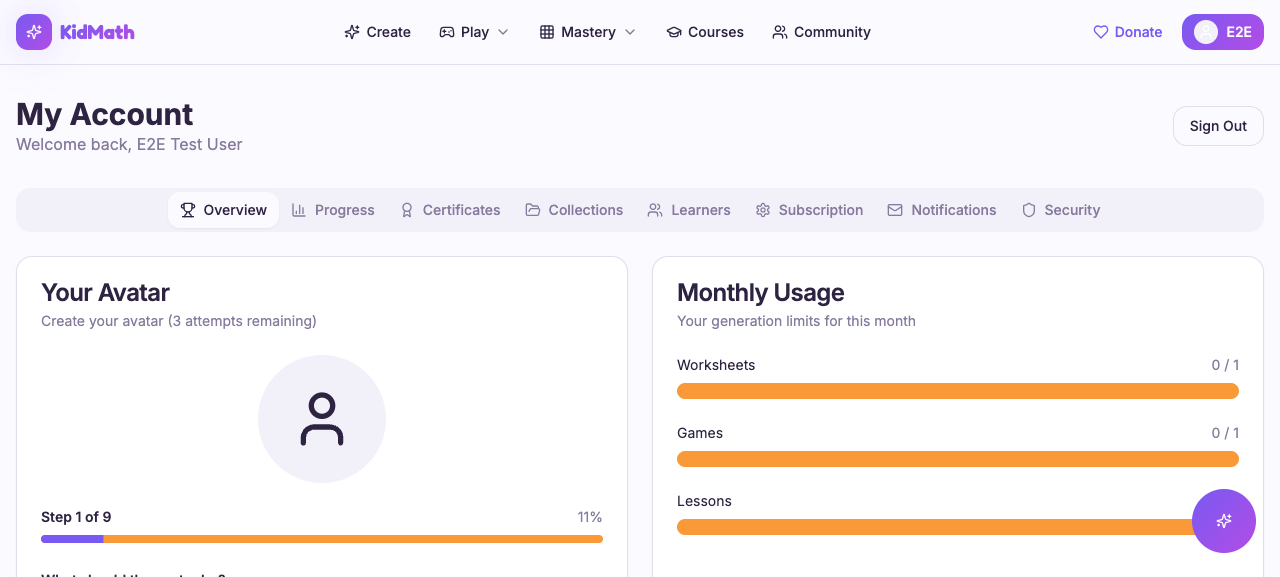
Sign-in: redirected to My Account
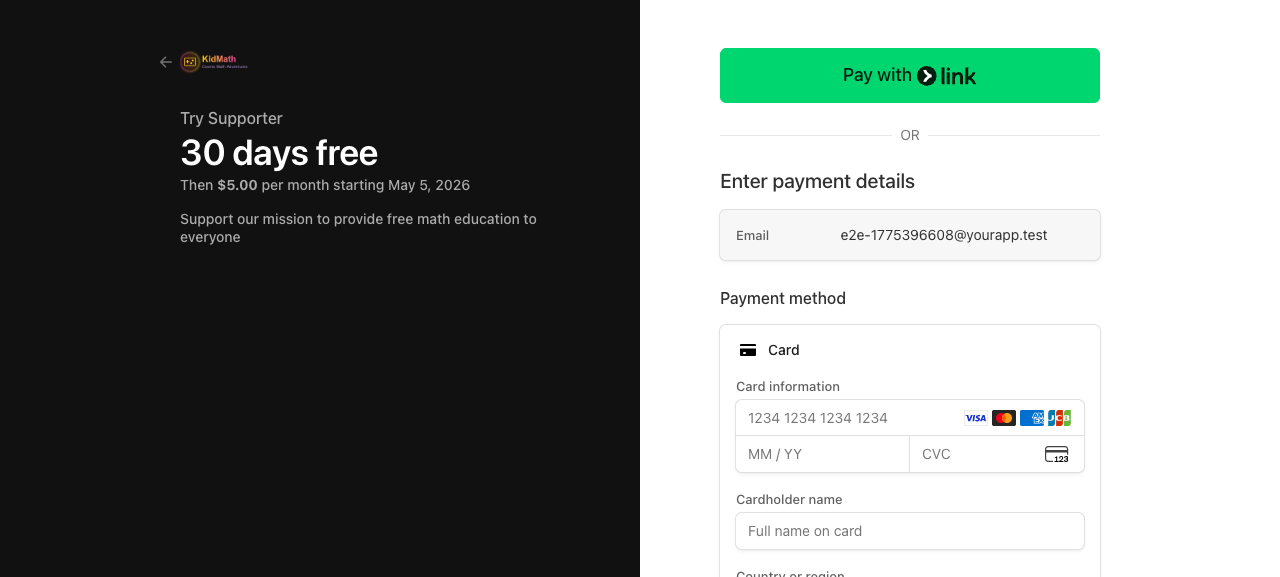
Purchase: Stripe Checkout redirect
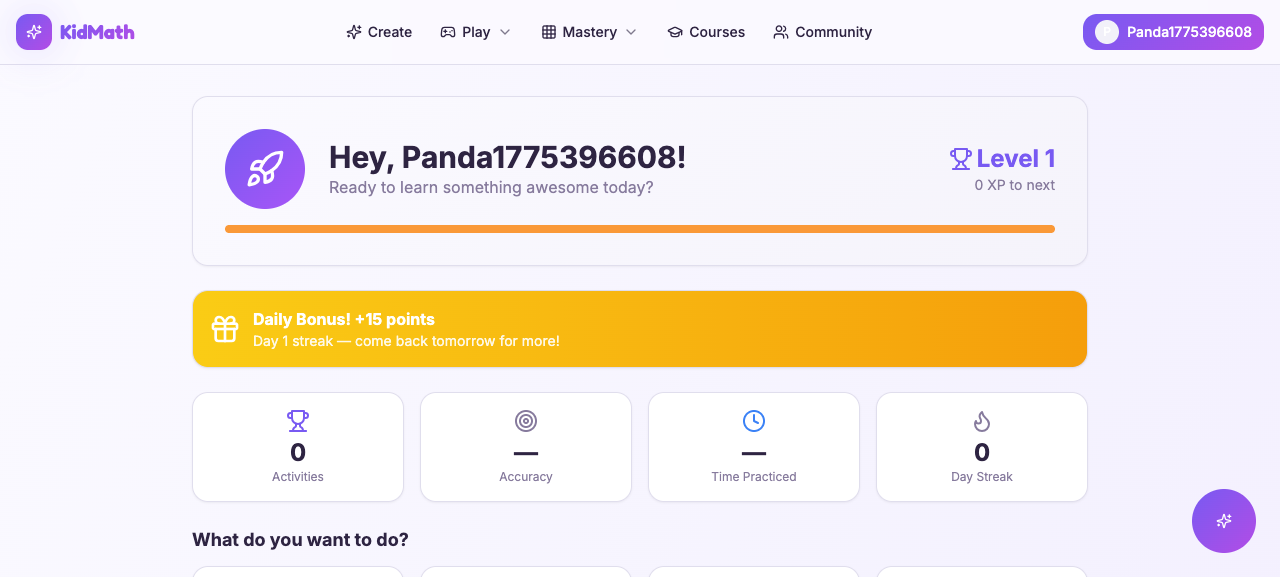
Learner login: dashboard with welcome
Every design decision that made this workflow reliable is captured in Lessons Learned below, with the reasoning behind each choice.
Why This Beats Playwright and Cypress
I'm not saying throw away your unit tests. I'm saying the way we write E2E tests is fundamentally broken, and this fixes it.
| Traditional E2E | sweny e2e |
|---|---|
| CSS selectors break on refactors | A11y tree snapshots adapt to UI changes |
| Coded test scripts to maintain | Natural language YAML, generated by wizard |
| Test framework + assertion library + page objects | sweny new + sweny e2e run |
| Brittle waits and retries | Agent reasons about page state |
| ~$0/run but hours of maintenance | ~$0.10/run, zero maintenance |
| Fixed assertion logic | Agent adapts (e.g., switches from sign-in to sign-up) |
| Per-project setup and plumbing | Portable: same workflow, any web app |
The adaptive behavior is the one that surprised me most. When a pre-provisioned sign-in fails (wrong password, user doesn't exist), the agent will try sign-up on its own. I didn't code that. The agent just reasons through it. In a Playwright suite, that's a hard failure. With an agent, it's a graceful fallback.
To be clear: This pattern doesn't replace unit tests or integration tests. It replaces the brittle top-of-the-pyramid E2E tests that verify user flows through a real browser. Your unit test coverage should stay exactly where it is.
Cost
This is the question everyone asks, and the answer is surprisingly cheap.
| Item | Cost |
|---|---|
| Per scenario (text tokens, no vision) | ~$0.02 - $0.05 (Sonnet), varies by model |
| Full suite run (4-6 scenarios) | ~$0.10 - $0.20 |
| Stripe test mode | $0 |
| agent-browser | Free, open source |
| Browserbase (CI) | Free tier available |
The "no vision" part is key. Because agent-browser uses the accessibility tree instead of screenshots, you're paying for text tokens only. Vision tokens are significantly more expensive. A single screenshot can cost as much as an entire scenario run.
Compare this to the hidden cost of traditional E2E: an engineer spending 2-4 hours per sprint fixing broken selectors. At any reasonable hourly rate, $0.20/run pays for itself after one avoided maintenance session.
GitHub Actions
Use the packaged swenyai/e2e@v1 action. It installs Node, @sweny-ai/core, and agent-browser, runs agent-browser install to pull Chrome, executes sweny workflow run on your YAML, and uploads the results/ directory as an artifact on every run, passing or failing.
name: E2E Tests

on:
  workflow_dispatch:
    inputs:
      base_url:
        description: "Target URL"
        required: false
        default: "https://yourapp.com"

concurrency:
  group: e2e
  cancel-in-progress: true

jobs:
  e2e:
    runs-on: ubuntu-latest
    timeout-minutes: 20

    steps:
      - uses: actions/checkout@v4

      - uses: swenyai/e2e@v1
        with:
          workflow: .sweny/e2e/conversion-funnel.yml
          base-url: ${{ inputs.base_url }}
          claude-oauth-token: ${{ secrets.CLAUDE_CODE_OAUTH_TOKEN }}
        env:
          # Anything your provision/test/cleanup nodes need
          SUPABASE_URL: ${{ secrets.SUPABASE_URL }}
          SUPABASE_SERVICE_ROLE_KEY: ${{ secrets.SUPABASE_SERVICE_ROLE_KEY }}
One step, no manual setup-node, no manual npm installs, no manual upload-artifact. The action handles all of it.
Two env var names for the target URL. The action exposes its base-url input to the workflow as BASE_URL. The wizard-generated workflows from sweny e2e init also read E2E_BASE_URL. If you run the wizard locally and the action in CI, the easiest fix is to set both, or standardize on the pattern you prefer when you edit the generated YAML. Add results/ to your .gitignore; the action uploads whatever the workflow wrote there as an artifact.
CI Tips
- ubuntu-latest is the right default for web-based testing. It's cheaper, faster to provision, and ships with Chrome preinstalled so agent-browser works out of the box. Reach for macos-latest only when you need Claude to drive a native app through a simulator, which requires the macOS toolchain.
- concurrency: cancel-in-progress prevents multiple E2E runs from stacking up and burning minutes.
- timeout-minutes: 20 gives a buffer above SWEny's default 15-minute per-workflow timeout.
- Override timeout with
sweny e2e run --timeout 300000for shorter or longer runs. - Run a single workflow with
sweny e2e run .sweny/e2e/purchase.yml. Useful for debugging a flaky flow without burning time on the full suite, or for splitting long suites into parallel CI jobs.
Going Deeper: The Programmatic API
The CLI covers the common case. But SWEny's programmatic API is still available when you need full control: custom skills with tool handlers, dynamic workflow generation, or integration into a larger system.
import { execute, ClaudeClient, createSkillMap } from "@sweny-ai/core";
import { browser } from "./skills/browser.js";

// Register custom skills with tool handlers
const skills = createSkillMap([browser]);
const claude = new ClaudeClient({ maxTurns: 80 });

// One function call runs the entire workflow
const { results } = await execute(
  workflow,
  { run_id, base_url },
  { skills, claude },
);
The CLI and the programmatic API use the same underlying executor. For most projects, the YAML-only approach is enough. But if you need typed tool handlers, dynamic workflow construction, or programmatic result processing, the API gives you that control.
You can also run workflows directly with sweny workflow run path/to/workflow.yml for one-off runs outside the E2E harness.
Beyond E2E: What Else Can You Orchestrate?
Remember the sweny new picker? E2E browser testing is one option. The same command also offers built-in workflow templates and an AI-powered "describe your own" option that generates a workflow from a sentence. The underlying model — DAG workflows with natural language instructions and structured output — is general-purpose. Once you see how it works for browser automation, you start seeing DAGs everywhere:
- Content pipelines. Node 1 researches a topic, node 2 writes a draft, node 3 reviews, node 4 publishes. Conditional edges handle "needs revision" loops.
- Data processing. Ingest from an API, transform with an LLM, validate against a schema, load into a database. Branching on validation failures.
- Code review automation. Check out a PR, run analysis, review the diff against conventions, post structured feedback.
- Multi-agent coordination. One node generates a plan, another executes it. SWEny handles the handoff and the data contract between them.
SWEny is a workflow orchestration framework for AI agents. E2E testing is just a particularly good fit because the problem maps naturally to "sequence of steps with structured output and conditional routing."
If you want to see real examples of each of these patterns, the SWEny Marketplace is a growing library of community workflows organized by category: Triage, Security, DevOps, Code Review, Testing, Content, Ops. You can browse the DAG for each one, see which integrations it needs, remix it into your own repo, or publish your own. The marketplace runs the same workflow format as .sweny/e2e/*.yml, so anything you build locally is already publishable.
Lessons Learned
Things I discovered the hard way across KidMath.ai, Awdio.ai, and Offload. Some of these cost me hours. Save yourself the debugging sessions.
- Close stale sessions before every run.
agent-browser close --allin the setup node. Without it, the agent sees leftover pages from previous runs, or a completely different app if another project used the daemon. - Poll for daemon readiness, don't sleep.
agent-browser get urlin a retry loop (30-second timeout) in the setup node beats a hardsleep 2. Daemon startup time varies between local and CI, and a hardcoded sleep is both flaky and slower than it needs to be. - The agent adapts more than you expect. When sign-in fails, it tries sign-up on its own. I didn't code that. The agent just reasons through it. Design your test instructions to explicitly support the intended path, or the agent will find its own.
- Be specific in instructions. "Verify a heading exists" will always pass. "Verify a heading about math education for kids" actually tests content. Vague instructions produce false positives.
- Screenshots are evidence, not assertions. The accessibility tree snapshot is the verification mechanism. Screenshots go in
results/for debugging and CI artifacts. Never gate pass/fail on screenshot content. - Use curl, not SDKs. The Supabase Admin API is simple REST. Raw curl in the YAML cleanup node handles it with zero dependencies. No reason to pull in an SDK for three API calls.
- Convention-based test data makes cleanup bulletproof. The
e2e-{timestamp}@yourapp.testpattern means cleanup can find and delete test users with a simple prefix match, even across crashed runs. No tracking table needed. - Route ALL failures through cleanup. Test failures must not leave stale data. Every test node's failure edge should go to cleanup, then report. The only exception: setup failure (nothing to clean up yet).
- The provision node is the single source of truth. It generates credentials, reads env vars, creates test data, and outputs everything. Subsequent nodes reference its output. No globals, no config files, no coordination.
- Bypass complex UI when testing isn't the goal. KidMath's avatar wizard is 9 steps. Testing it is a separate scenario. For the conversion funnel test, I insert the learner via PostgREST and verify the UI reflects it. Test the thing you're testing.
- Verify redirects, not third-party UIs. The purchase test confirms Stripe checkout redirect happened (proves the edge function works) but doesn't fill Stripe's payment form. That's Stripe's responsibility.
- Port conflicts are silent killers. If
E2E_BASE_URLpoints to the wrong port, all tests pass against the wrong app. Always verify the target URL first. - Start with the conversion funnel. Sign-up or sign-in, one core feature, and one flow that touches your payment system. Get those green before expanding. The YAML is easy to extend once the pattern is working.
Wrapping Up
That's the whole thing. Two commands replace your entire E2E suite. The wizard generates YAML, the runner executes it with an AI agent driving a real browser, and you maintain prose instead of selectors. The YAML you write today keeps working when you redesign the sign-up form tomorrow, because the agent reads the accessibility tree and reasons about intent, not class names.
Try it on your current project:
npm install -g @sweny-ai/core
sweny new          # pick "End-to-end browser testing"
sweny e2e run      # run the generated tests
Pick one flow, get it green, then expand. Start with whatever converts users: sign-up, sign-in, or checkout. Those are the flows where broken tests cost you the most, and they're also the ones where an adaptive agent earns its keep. Once you have one workflow passing, run sweny new again to add the next one — the picker is safe to re-run in an existing project and won't clobber your config.
When you're ready to do more than browser testing, the SWEny Marketplace is a good next stop. It's a free community library of pre-built DAG workflows for everything from alert triage to code review automation. Same format as the files your E2E wizard just generated, so anything you pick up there drops into .sweny/workflows/ and runs with sweny workflow run.
The shift is subtle but worth stating plainly: you no longer describe how to test your app, you describe what you want verified. The agent figures out the how. That's the whole promise, and after running this pattern in production across multiple apps, I can tell you it holds up.
Resources
Everything you need to get started and go deeper.
SWEny
Official documentation for SWEny workflows, skills, the executor API, and the CLI.
Source code for the SWEny CLI and @sweny-ai/core library.
Standalone repo for the SWEny E2E pattern: ready-to-run workflow templates, examples, and the quickest path to marketplace surface area for browser testing.
Managed SWEny workflows with hosted execution, monitoring, and team collaboration.
Free community library of pre-built DAG workflows: triage, security audits, code review, content pipelines, and more. Browse, remix, or publish your own.
Full reference for sweny new, sweny e2e run, and the CLI commands, including template variables and cleanup options.
Browser Automation
CLI daemon for browser automation via accessibility tree snapshots. The browser control layer in this pattern. Source at github.com/vercel-labs/agent-browser, npm package agent-browser.
Hosted browser sessions for CI environments without local Chrome. Free tier available.
AI and APIs
Anthropic's Claude models. SWEny uses Claude via the Agent SDK for reasoning and tool use.
Anthropic's agentic coding tool. CLAUDE_CODE_OAUTH_TOKEN lets SWEny use Claude without burning API credits.
The admin API used for test user provisioning and cleanup in the Supabase backend option.